


SPC OFFICE PRO
SPC OFFICE PRO
Regular price
€26,99
Selling price
€26,99
Regular price
Taxes included.
Solid design, efficiency in every call.
Desk or wall-mounted landline phone, sturdy and clear, with a large illuminated screen, 7 direct memories, hands-free function, mute, and caller ID. Designed for hassle-free calling, easy-to-read information, and comfortable daily use.
Présentation du produit
Présentation du produit
Spécifications techniques
Spécifications techniques
Related products
Everything much more intuitive, everything under control
-
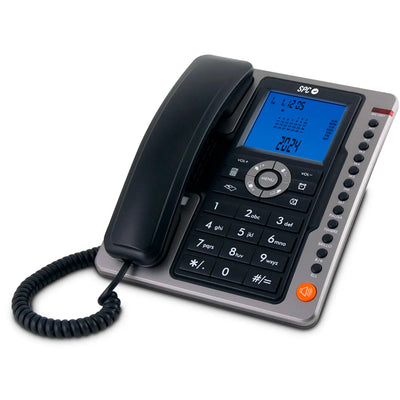
Very large and bright screen to see everything at a glance
-

Quick calls to frequent contacts with a single button
-

Hands-free for comfortable and long conversations
-

With large keys and designed for both home and office use


Designed to use safely from the first day.
Screen illuminated in blue color with 8 levels of contrast
Caller identifier to see who is calling
7 direct memories, a good shortcut for frequent contacts

A perfect phone for the office
Music on hold to activate during a call
Call forwarding if you have another Office Pro connected
List of incoming and outgoing calls

Technical support
Send our team a message and we will reply as soon as possible
How do I start using the telephone when I receive it?
How do I start using the telephone when I receive it?
Connect the cord to the telephone socket and the phone. No complicated setup is needed: when you insert the 3 AA batteries, the screen lights up and you can make and receive calls.
Is it easy to see who is calling if I have poor eyesight?
Is it easy to see who is calling if I have poor eyesight?
Yes. The screen is large, it is lit, and allows you to adjust the brightness so that the information is clearly visible even in low light. But you have to have the caller ID service active with your phone company.
Can I quickly call my usual contacts?
Can I quickly call my usual contacts?
Yes. You can save up to 7 numbers in the direct memories (M1-M7) and call them by simply pressing a button.
Can you speak without holding the handset?
Can you speak without holding the handset?
Yes. Activate the hands-free function and you will be able to speak comfortably while doing other tasks.
What should I do if they call me and I cannot answer at that moment?
What should I do if they call me and I cannot answer at that moment?
The telephone keeps a record of calls so you can see who has called and return the call when it suits you best.