


We kick off the 1st Edition of Senior Week with a super interesting introduction to help you know what to look for when choosing a smartphone for seniors. Physical keys, assistance buttons, or smart care features are some of the characteristics that, from our experience as phone specialists, smartphones for older adults should include.
SPC’s phones for seniors adapt to their needs, so they don’t have to adapt to new technologies.
Technology has been evolving more and more. Far from seeing this as a problem for older people using tech devices, at SPC we see a great opportunity as electronic devices become more advanced and include features that help older adults use them in a very simple, easy, and intuitive way. In this way, the technology itself will help this segment of the population not feel left out, thus helping to close the digital gap that separates seniors from the rest of society.
For this reason, we’re going to show you the basic features a smartphone for seniors should have.
- Comfort with physical keys: Our seniors deserve to have all the conveniences at their fingertips. That’s why one of the necessary features for a smartphone aimed at seniors is to include physical keys that make it easier to use since pressing buttons is the most natural thing for them.
- Don’t forget the SOS button: Older adults may find themselves more often in situations where they need to ask for help. In this regard, an SOS assistance button located on the device will be very practical on any mobile device. When pressing this type of button, the smartphone automatically calls and sends an emergency SMS to predefined contacts with information about the device’s location. Once the call is answered, the Hands-Free function is automatically activated to facilitate asking for help if hands cannot be used. Also, when this button is pressed, the device emits a sound signal to alert nearby people so they can provide assistance.
- The importance of Easy Mode: Having an Easy Mode on the device is more than a necessity. This mode usually includes large, very visual, and colorful icons, making the screen easier to see and the device easier to use. Some devices on the market include options that allow you to display a simplified menu with direct access to 6 favorite contacts.
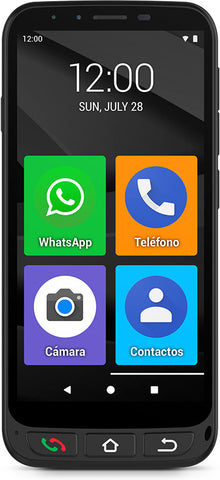
- Always connected through the camera: Another feature a smartphone for senior users should include is a rear and front camera to take the best photos and video calls, keeping older adults close to their family and loved ones when they can’t be together.
- Ensure accessibility with a shortcut app: Make technology easier for senior users through apps like the one included on the ZEUS 4G PRO smartphones with its Shortcuts app. With it, you can easily and intuitively access the phone’s most common settings, such as font size or turning airplane mode on and off.
- Smart care features: Prioritizing peace of mind not only for seniors but also for their families is a must. SPC’s devices for seniors include Smart Help, a set of features that includes three smart help options with a dual purpose: on one hand, bringing technology closer to seniors; on the other, offering the calm their families need knowing they will be alerted by the device itself if something goes wrong. The three functions are:

- Remote configuration: this option allows a trusted contact to configure some aspects of the device remotely from their own phone by sending a series of SMS codes without the senior needing to be near the device or perform any action. Thanks to this function, the SOS button can be activated and configured, contacts can be added to the address book, or the volume can be turned up to maximum.
- Smart notifications: this feature provides family members and close contacts of the senior with the peace of mind they need when they can’t be nearby. The smartphone sends an SMS to a predefined trusted contact if it detects unusual inactivity situations, such as a missed call not answered or lack of phone charging.
- Smart ringtone: thanks to this function, the smartphone automatically raises the ringtone to maximum if the device detects that, after a missed call, the same contact calls again within 3 minutes. This feature is a great help for older people who need a high ringtone volume to hear incoming calls well.


